
Android phones include hidden dial codes that let users access important device information instantly. From checking your IMEI number and SAR radiation level to monitoring data usage and testing phone sensors, these four secret codes help you understand, verify, and troubleshoot your device without installing any apps. Knowing these codes can improve security awareness, performance checks, and overall smartphone safety.
📱 4 Secret Android Codes You Must Know
📱 1. IMEI Code (*#06#)
IMEI Code Purpose :
The IMEI (International Mobile Equipment Identity) code is used to uniquely identify a mobile phone. It helps track or block a lost or stolen device, verify authenticity, check warranty status, and assist network providers in managing and securing mobile devices.
The IMEI code is universal for all mobile phones, including both Android and iOS devices. Every phone has a unique IMEI number that identifies it on mobile networks, regardless of brand or model.
| Platform / Brand | IMEI Access Method | Notes |
|---|---|---|
| Android (All brands) | Dial *#06# | Works on Samsung, Xiaomi, OnePlus, Oppo, Vivo, Huawei, and others. Also in Settings → About Phone. |
| iOS (iPhone) | Dial *#06# or Settings → General → About | IMEI is also printed on the SIM tray or original box. |
Find It Without The Mobile Box :
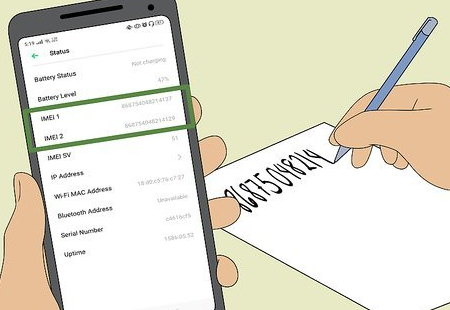
If you’ve lost or missed the IMEI label on your mobile box, there’s no need to worry. You can easily view your phone’s IMEI number directly on your device by dialing *#06#. This works instantly on almost all mobile phones and helps you access your IMEI anytime without packaging or documents.
This code instantly displays your phone’s IMEI number, which is essential for device identification, warranty checks, and blocking a lost or stolen phone. No internet or app is required—just dial the code.
📡 2. SAR Value Code (*#07#)
SAR value Purpose :
SAR (Specific Absorption Rate) indicates the amount of radio-frequency radiation absorbed by the body when using an Android phone. Checking the SAR value helps users understand device safety standards and ensures the phone complies with regulatory exposure limits.
The SAR value code is not fully universal across all Android devices. While many Android phones support the *#07# code to display SAR information, some manufacturers show SAR details only in phone settings, user manuals, or official websites. Availability may vary depending on the brand, region, and Android version.
For iOS (iPhone) devices, SAR information is not accessed via a dial code. Instead:
- Go to Settings → General → About → Legal → RF Exposure to view SAR values.
- The SAR value is also printed in the original iPhone box.
The SAR code shows your phone’s radiation exposure level, helping users understand safety limits set by regulators. It’s useful for health-conscious users who want to check radiation compliance.
📊 3. Data Usage Access Code (##4636##)

Data Access Purpose :
This hidden menu provides detailed data usage, network status, and phone information. It helps diagnose connectivity issues and monitor mobile data behavior without third-party apps.
The *#*#4636#*#* code (often written as ##4636##) is partially universal on Android devices. It works on many stock Android phones and some brands, but not all manufacturers support it. Brands like Samsung, Xiaomi, Oppo, Vivo, and OnePlus may disable or limit this menu in certain models or regions. When available, it shows detailed phone info, network status, and data usage.
For iOS (iPhone), there is no dial code to access data usage. Instead, Apple provides this information through settings:
- Go to Settings → Cellular (or Mobile Data)
- Scroll to view app-wise data usage and reset statistics if needed.
🧪 4. Sensor Test Code (#0#*)
Sensor Test Purpose :
This code opens a hardware testing menu where you can check sensors like the accelerometer, proximity sensor, gyroscope, touchscreen, and camera. It’s useful for detecting hardware problems.
While *#0*# works mainly on Samsung devices, other Android brands have their own hidden codes for testing sensors:
| Brand | Sensor Test / Diagnostic Code | Notes |
|---|---|---|
| Xiaomi | *#*#6484#*#* | Opens the hardware test menu for sensors and components. |
| OnePlus | *#808# | Provides sensor and hardware testing options. |
| Oppo | *#800# or *#36446337# | Accesses hardware and sensor testing menus. |
| Vivo | *#*#64663#*#* | Opens the hardware diagnostic menu including sensors. |
| Huawei | *#*#2846579#*#* | Opens ProjectMenu for sensor and device diagnostics. |
Note: These codes may vary slightly depending on the device model and software version. Always enter codes carefully as they access hidden diagnostic menus.
For iOS (iPhone), there is no dial code for sensor testing. iPhone users can test sensors through:
- Settings → Accessibility → Touch / Motion for some sensor-based functions
- Third-party apps from the App Store for more detailed sensor diagnostics

Leave a Reply